Adobe Is Building An AI To Automate Web Design. Should You Worry?

Adobe, one of the world’s largest and most powerful software companies, is trying something new: It’s applying machine learning and image recognition to graphic and web design. In an unnamed project, the company has created tools that automate designers’ tasks, like cropping photos and designing web pages. Should designers be worried?

The new project, which uses Adobe’s AI and machine learning program Sensei and integrates into the Adobe Experience Manager CMS, will debut at the company’s Sneaks competition later in March. While Adobe hasn’t committed to integrating it into any of its products, it’s one of the most ambitious attempts to marry machine learning and graphic design to date. There have been efforts to use AI in the design world before—for instance, Wix’s Advance Design Intelligence and automated projects like Mark Maker, but Adobe’s is notable because of the company’s sheer reach in the design world. Although it’s just a prototype, it’s one to watch closely.

The as-of-yet unnamed new product is designed, first and foremost, to make it easier to customize websites for users at large-enterprise customers. When I viewed a demo, for instance, machine learning and AI techniques were applied to editing the Food Network’s web pages.

Instead of a designer deciding on layout, colors, photos, and photo sizes, the software platform automatically analyzes all the input and recommends design elements to the user. Using image recognition techniques, basic photo editing like cropping is automated, and an AI makes design recommendations for the pages. Using photos already in the client’s database (and the metadata attached to those photos), the AI—which, again, is layered into Adobe’s CMS—makes recommendations on elements to include and customizations for the designer to make.

According to Cedric Huesler, a product management director for Adobe Marketing Cloud who worked on the project, the idea is offering what he calls “human-augmented” design. The AI offers recommendations, which designers can manually override.

“The problem, obviously, is personalization at scale,” Huesler tells Co.Design. “We can repeat the same process just by providing different inputs”—once implemented, the machine learning tool is designed to let large-enterprise users quickly generate customized content. In the case of large-enterprise customers like the Food Network, Adobe says, partial automation lets them create customized web and mobile experiences for customers more quickly and more affordably than they could otherwise.

The AI is meant to make design easier for large projects. It includes both image recognition components that automatically crop or otherwise edit photos, and more conventional components that rely on text metadata for design decisions.

Huesler points out that, in the Food Network example, content could be instantly customized for users. For example, users whose activity indicates they are lactose intolerant or gluten intolerant will see different recipes and images highlighted. The machine learning product won’t actually handle the heavy lifting of reimagining an interface and making complicated UI or UX decisions. But it can, for instance, help quickly determine what photos and text content are ported onto pages designed for very small user segments.

“Every brand wants to do personalization,” says Steve Hammond, senior director of product of Adobe Marketing Cloud. “They want to make content relevant to individuals and audiences, but as you expand the audiences you’re creating content for, you face two bottlenecks: How do you create variations of content, and how do you create imagery for them?”

These bottlenecks, he says, are something that machine learning can help tackle.

Once again, an old theme in the world of machine learning is picked up here. In the case of web design and graphic design, machine learning helps automate tedious and boring tasks. The vast majority of graphic designers don’t have to worry about algorithms stealing their jobs anytime soon because, while machine learning is great for understanding large data sets and making recommendations, it’s awful at analyzing subjective things such as taste. Nonetheless, it’s important to note that tedious and boring tasks describe much of the entry-level work that’s done in the design world. It’s safe to bet that in the coming years, machine learning tools will be used for many of the tasks that entry-level workers do now.

Approximately 60% of the projects exhibited at Sneaks make their way into Adobe products as functionality improvements or new features. Whether or not Huesler’s feature or a similar one is integrated into Experience Manager or another Adobe product (which is always possible, given the company’s wide presence in the design world), the company is investing a lot of resources in AI and machine learning.

The functionality’s debut at the Sneaks competition, will be part of a wide display of experimental projects Adobe’s employees work on. Sneaks is a major event inside Adobe’s internal ecosystem—the company brings celebrity cohosts (past years included Carrie Brownstein and Thomas Middleditch; this year’s host is Kate McKinnon) each year.

Huesler’s proof-of-concept uses Adobe’s Sensei platform, which offers machine learning and AI frameworks for the company’s products. Sensei is already slowly working into Adobe’s popular Creative Cloud platform and other products; for instance, in Creative Cloud, it assists with image recognition and editing facial expressions.

Adobe has poured a considerable amount of resources into Sensei, which was publicly unveiled in late 2016.

In our conversation, Hammond was excited for the potential Sensei held for solving vexing design problems. He noted that one of the big problems facing Adobe’s corporate clients is offering customers uniform experiences across different platforms such as desktop websites, mobile websites, smart-home devices, advertising, call centers, and touchscreen kiosks. Automating the minutiae of design, he adds, makes things easier for these customers.

But at what cost? For now, artificial intelligence isn’t stealing any designer’s job—existing efforts are good at cropping photos and making minor visual modifications, and that’s it. But Adobe’s project is one of the first in a very new field. Expect more in the future.

from Sidebar http://sidebar.io/out?url=https%3A%2F%2Fwww.fastcodesign.com%2F3068884%2Fadobe-is-building-an-ai-to-automate-web-design-should-you-worry


Google cofounder Sergey Brin talks about AI and automation

Here are three links worth your time:

  1. Google cofounder Sergey Brin talks about AI, automation, and the future of education (34 minute watch)
  2. A brief history of random numbers (8 minute read)
  3. Priest Willis interviews me about freeCodeCamp and the future of education (40 minute listen)

Thought of the day:

“Everyone should have access to education. Primary education, secondary, university, and for that matter, post-graduate work. Those things are extraordinarily expensive today, but that’s an artifact of the infrastructure. We assume we need big buildings and fancy classrooms and things like that. I don’t think those are necessary. It’s fine to have those for some folks. But education should be universally accessible.” — Sergey Brin
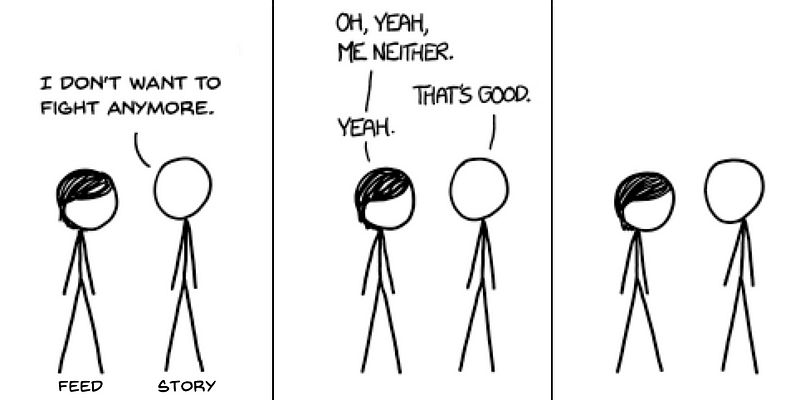
Funny of the day:

Webcomic by XKCD

Study group of the day:

freeCodeCamp Orange County

Happy coding!

– Quincy Larson, teacher at freeCodeCamp


Google cofounder Sergey Brin talks about AI and automation was originally published in freeCodeCamp on Medium, where people are continuing the conversation by highlighting and responding to this story.

from freeCodeCamp https://medium.freecodecamp.com/google-cofounder-sergey-brin-talks-about-ai-and-automation-afd4075fada?source=rss—-336d898217ee—4

Designing Design System for Complex Products


Designing Design System for Complex Products

Benefits of design system and how to build it

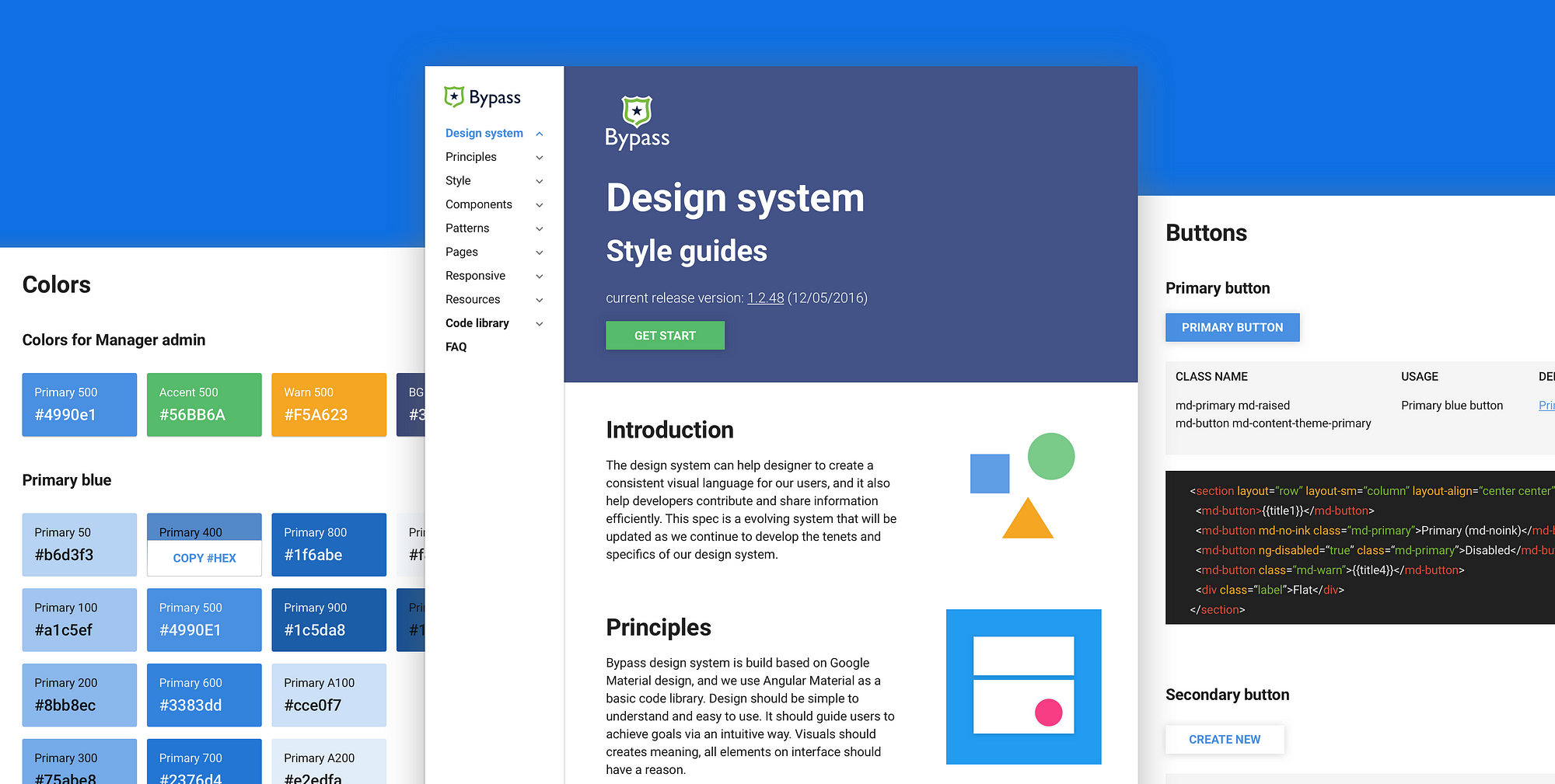
Bypass design system concept

In my last article How to get a head start on design system”, I talked about how to start building a simple style guide when you lack resources. Today I’ll share more knowledge about the process of building a design system for complex products (such as SaaS web applications). And I’ll share some helpful resources in the end as well.

Why did we start

Back in early 2014, when I just joined Bypass, because our products were very complicated, there were tons of inconsistency across the board. There were different buttons, different inputs, different layouts of the same element, and different interactions for the same flows. We wasted a lot of time debating design details, just because there were no solid rules for our product. These inconsistencies also brought bad experience to our users: they caused confusion and made it harder to understand and learn the system.

On the development side, because of the variety in code library, it was hard to find the “correct code”. Sometimes developers just wrote new codes instead of reusing the old ones, which led to even more inconsistency. It was a vicious circle, and with our team growing over time, communication and product delivery got harder.

Problems we had

1.50 shades of grey: Since our products were very complex, it was always hard to keep consistency. There were many UI inconsistencies across the system, including different colors, fonts, font sizes, etc.

2.Lack of rules: When our designers were building a new feature, it was easy for us to get bogged down with the details. Even simple questions like “Which component should I use?” and “Should I guide users to a new page, or use a pop-up dialog instead?” became very time-consuming to decide on.

3. Poor quality of delivery: Because of the lack of design rules, it was very hard for different teams to communicate with each other. I used to put lots of “red lines” with detailed descriptions on my design, to provide as many details as possible to the developers. But it was not an efficient way to hand off, and sometimes developers did not follow all the details I put on my design.

Imagine that your team launched a new project and people were celebrating, but you noticed a bunch of design bugs. You must be as happy as everyone else was, no?

The happy you

4.Inconsistent code library: Because there was no rule, developers sometimes just grabbed what they found in the code base and implemented it in new projects. Some other times, they came up with completely new components with a different style, and this further complicated the code library.

5. User confusion: Our users needed a logic path to study the product and build a mental model about it. However, the inconsistencies we had made them confused and frustrated when they could not get their expected feedback.


How to build a design system

1.Start with the style guide

A style guide is the infrastructure of the design system, to know more details about it, you can refer to my previous articleHow to get a head start on design system.”

*Optional: build a live library

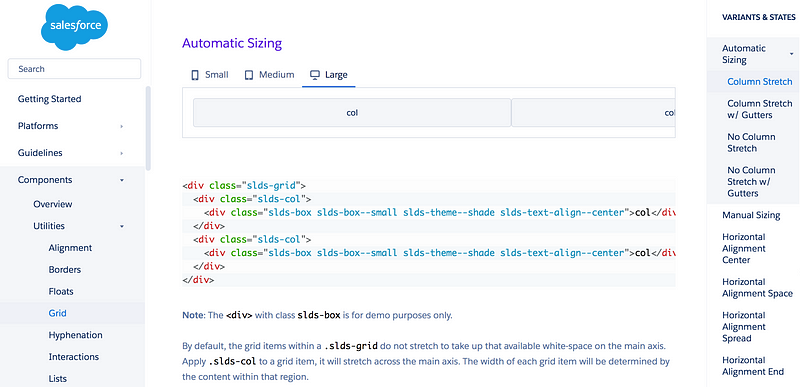
Lightning design system

If you have a front-end buddy or you can code yourself, a live library can make everyone’s life easier. It’s an efficient tool for front-end developers to keep consistency, avoid mistakes and speed up the development process. Lightning design system and Angular material are good examples for live library

Find your front-end buddy who cares about design details. Then talk about the components in style guides with him/her, and find the best way to build them. Listen to your buddy, because sometimes your front-end buddy will have amazing ideas that you have never thought about. Then document the codes for each component, and make sure that developers can easily understand and reuse them.

Finding the developer who cares about CSS #uxreactions via @uxreactions

2.From style guide to design system

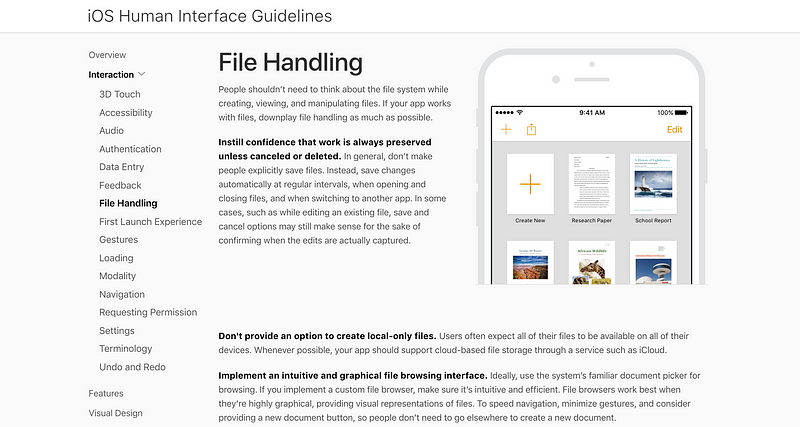
iOS design guidelines

During the process of building the style guide, you also gain more knowledge about the product. After the style guide is done, you can move on to include guidelines, principles, rules, and of course.

You can document very detailed rules. For example, you can have a section on “How to delete an object”, and the intro would be “Edit object, trigger edit panel, delete object, pops up confirmation dialog, confirm to delete the object, back to index with “Object deleted.” toast.”

You can also add “don’t” and “do” examples for each design pattern. It will help people get clear idea about how to reuse these components. And you can also describe in which situation, with what conditions, designers should use which design pattern.


Benefits of having a design system

Efficient tool for product people

Design system is a recipe that helps designers to run the “kitchen” smoothly. Buy using the same recipe, designers can keep offering quality “dishes” to customers. Designers can find what ingredients they have in the library, as well as when and where to use them. And it’s also a very good hand-off tool that can keep everyone on the same page.

Efficient tool for developers

A live library that has all global components can speed up the development process. It can allow developers to copy and paste codes, and help them to work easily, quickly and reduce bugs. Each developer can also contribute to the library to make it become an “evolving system”.

Smooth hand-off tool

As the company grows, cooperation and hand-off work become harder and harder. With the design system, hand-off becomes easily and smoothly. There are three groups of people who can take advantage of it.

For QA people, they know what to test, and whether the delivery matches with design rules. For designers, there’s no more debating about global interactions. Also, designers can work on other designers’ design file without any confusion. For developers, they can understand design files clearly, and build them out in a proper way.

Quality delivery, consistent UI & expectation

Thanks to the consistent components and design rules, we get high quality outcomes across the board. For our users, it’s easier for them to learn and operate. Now they can study the system pretty easily and get their expected feedback every time.


Once design system is implemented

Bringing a great design system to live is like this:

Redesigning a legacy application #uxreactions via @uxreactions

and everyone in your company is like this


Style guides resources & tools

The following is a list of resources I use to build our design system, and tools that very helpful for beginners.

Thanks for @Ignacio Giri’s comments on my last article about style guide tools. Consider about different usages, I will include some powerful CMS tools as well. If you have any config & front-end knowledge, these tools can help you and your team build live library pretty easily.

The CMS Tools

[1]Github

Github is a developer friendly tool to manage live style guides. Here’s a very helpful article talk about how to manage style guides with Github: Managing style guides at Shyp

[2]Statamic

Statamic is a powerful tool that could be used by both designers and developers. Once you install and study the proper way to use it, you can build a live library quickly. It is also powerful for you and your team to do version control.

[3]Cloudcannon

If you are a designer who know how to work with HTML, JavaScript, CSS and any static content, Cloudcannon is the tool that can help you do things right. It’s kind of similar with the way you customize your personal website in Squarespace. And it’s powerful for agency designers who are in charge of tons of display websites at the same time.


Tools without coding skills

[1] Craft

Craft is a Sketch plugin that can help designers cooperate via a cloud design library. Designers can cooperate to build style guides and components symbol library with it.

[2]frontify.com

Frontify is an online style guide documentation tool. It’s very friendly for beginners.

[3]Confluence is a team documenting tool that usually be used to document everything about product, including design principles, rules, and etc.


Examples for design system

Material Design

It is the famous design guidelines that publicized by Google. It Includes introduction, style, motion, layout, components, patterns, growth &communications, usability and resources. It’s very helpful if you want to build your product in Google material style, or your team is using any material design frameworks.

Material guidelines do not have a code library, but there are some third party resources that built base on Material design. Such as Angular Material, Material Design Lite, Material for Bootstrap and Material UI.

Lighting Design System

Lighting design system is build for Salesforce SaaS product. It includes guidelines, components, design tokens, icons, and related resources. Designers can put component classes name on design deliveries, then developers can build the correct components easily.

For example, if a designer says : “I want to apply a light shadow to this card.” Then the card shadow spec in sketch is like 0px 2px 2px 0px rgba(0,0,0,.16). And they can provide the class name as $elevation-shadow-2on design mockups, it can help developers to build the exact card that designers want.

Other examples:

iOS human interface guidelines

IBM Design Language

Styleguide.io (you can find tons of examples on this website)

Style Guide Inspirations by Muzli


Thanks for reading!

If you like my articles, you are more welcome to give me a ❤️ :)