The best free online courses of 2017 according to the data


The results are in! In 2015, Class Central first published a ranking of the best online courses of the year based on reviews from our users. I did it again in 2016. Now I’m back with a list of the best online courses of 2017. Like last year and the year before, this year’s list is based on thousands of reviews written by our users.

The methodology is simple. I made a list of all the courses that were offered for the first time in 2017 (which comes out to be over 2,000 courses), ranked the courses by the Bayesian average of their ratings, and filtered out the ones with less than ten reviews.

As you will see below, some of the highlights of this year’s ranking include: a new course by the team that created Learning How To Learn, one of the most popular MOOCs of all time; a new course from Andrew Ng, one of the founders of the modern MOOC movement; and, for you Italian speakers, three new courses from Italy’s University of Naples Federico, which started offering its MOOCs on the edX platform in 2017.

So without further ado, here are 2017’s best online courses:

Mindshift: Break Through Obstacles to Learning and Discover Your Hidden Potential
McMaster University via Coursera
Mindshift is designed to help boost your career and life in today’s fast-paced learning environment. Whatever your age or stage, Mindshift teaches you essentials such as how to get the most out of online learning and MOOCs, how to seek out and work with mentors, the secrets to avoiding career ruts (and catastrophes) and general ruts in life, and insights such as the value of selective ignorance over general competence.
★★★★★ (1250 ratings)

Mountains 101
University of Alberta via Coursera

Mountains 101­­ is a broad and integrated overview of the mountain world. This 12-lesson course covers an interdisciplinary field of study focusing on the physical, biological, and human dimensions of mountain places in Alberta, Canada, and around the world. Specifically, we’ll study the geological origins of mountains, how they’re built-up and worn-down over time; we’ll learn about their importance for biodiversity and water cycles, globally and locally; we’ll explore their cultural significance to societies around the globe, and how that relationship has evolved over time; and we’ll learn how mountains are used, how they’re protected, and how today they’re experiencing rapid change in a warming climate.
★★★★★ (273 ratings)

Quantum Mechanics for Everyone
Georgetown University via edX

Quantum Mechanics for Everyone is a four-week long MOOC that teaches the basic ideas of quantum mechanics with a method that requires no complicated math beyond taking square roots (and you can use a calculator for that). Quantum theory is taught without “dumbing down” any of the material, giving you the same version experts use in current research.
★★★★★ (24 ratings)

Extinctions: Past and Present
University of Cape Town via FutureLearn

This free online course explores how life on earth has been shaped by five mass extinction events in the distant past. At present, biodiversity is facing a crisis, with the prospect of a sixth extinction event today.
★★★★★ (42 ratings)

Viruses & How to Beat Them: Cells, Immunity, Vaccines
Tel Aviv University via edX

Learn how our immune system fights viral disease and make better vaccination decisions with a clearer understanding of Cells, Viruses, and Immunity.
★★★★★ (21 ratings)

Basic Spanish 2: One Step Further
Universitat Politècnica de València via edX
Beginner’s course for learners of Spanish that focuses not only on language, but also on cultural aspects, specifically designed for English speakers.
★★★★★ (57 ratings)

Comprendere la filosofia
University of Naples Federico II via edX

Che cosa è la filosofia? Questo corso offre un racconto del pensiero filosofico attraverso quattro epoche da quella antica cosidetta della contemplazione a quella più recente.
★★★★★ (21 ratings)

Positive Psychiatry and Mental Health
The University of Sydney via Coursera
In this course, we will explore different aspects of good mental health as well as provide an overview of the major kinds of mental disorders, their causes, treatments and how to seek help and support. The course will feature a large number of Australian experts in psychiatry, psychology and mental health research, and we will also hear from “lived experience experts”, people who have lived with mental illness, and share their personal stories of recovery.
★★★★★ (13 ratings)

Dante tra poesia e scienza
University of Naples Federico II via edX

La Commedia di Dante è una delle opere più tradotte e stampate nelle lingue e nei dialetti del mondo. Un testo scritto nel 1300 che affronta temi ancora oggi attuali, e che può rendere l’uomo del nostro tempo più vicino «a quell’amore che move il sole e l’altre stelle.
★★★★★ (15 ratings)

Introductory AP® Microeconomics
Massachusetts Institute of Technology via edX

This economics course is an introduction to basic microeconomic principles. You will learn how individuals make decisions ranging from what type of goods to buy to how many hours to work, and how firms make decisions ranging from how many workers to hire to what prices to charge.
★★★★★ (31 ratings)

Introducción a la programación orientada a objetos en Java
Universidad de los Andes via Coursera
¡Le damos la bienvenida al curso de Introducción a la programación en java por objetos de la Universidad de los Andes! El propósito de este curso es ofrecerle un ambiente interactivo orientado a construir aprendizajes sobre el lenguaje de la programación en Java para la creación y manipulación de objetos.
★★★★★ (17 ratings)

EU policy and implementation: making Europe work!
Leiden University via Coursera
People have become more critical of European policy and often seem to prefer local policy solutions in response to globalisation problems. How do you experience EU policy? Does it help? And if not, how can we change this?
★★★★★ (35 ratings)

Quantum Mechanics: 1D Scattering and Central Potentials
Massachusetts Institute of Technology via edX

In this quantum physics course you will learn the basic concepts of scattering — phase-shifts, time delays, Levinson’s theorem, and resonances — in the simple context of one-dimensional problems. We then turn to the study of angular momentum and the motion of particles in three-dimensional central potentials.
★★★★★ (11 ratings)

Patrick Henry: Forgotten Founder
University of Virginia via Coursera
Patrick Henry, who helped to ignite a revolution, deserves better. This course will explore how he overcame challenges to reach the pinnacle of Virginia politics and unite Americans behind a challenge to Britain — the eighteenth century’s super-power, why he opposed the U.S. Constitution, and why he then came out of retirement to defend the people’s Constitution against the attacks of Jefferson and Madison.
★★★★★ (13 ratings)

L’Italiano nel mondo
University of Naples Federico II via edX

La diffusione dell’italiano nel mondo è veicolata da canzone, cinema, teatro, opera lirica, gastronomia, design che diffondono anche per la lingua un’immagine legata alle eccellenze italiane. Questo corso ti guiderà nella comprensione della lingua italiana, nel suo evolversi nell’uso quotidiano ed in rapporto alle diverse funzioni cui è destinata.
★★★★★ (21 ratings)

Introdução ao Controle Moderno
Instituto Tecnológico de Aeronáutica via Coursera
Este curso lhe dará a base necessária para entender técnicas mais avançadas de controle moderno.
Você aprenderá como representar a dinâmica de um sistema no espaço de estados, como analisar um sistema no espaço de estados, como projetar uma realimentação de estado e como projetar um observador de estado.
★★★★★ (11 ratings)

Whole genome sequencing of bacterial genomes — tools and applications
Technical University of Denmark (DTU) via Coursera
The course will give the learners a basis to understand and be acquainted with WGS applications in surveillance of bacteria including species identification, typing and characterization of antimicrobial resistance and virulence traits as well as plasmid characterization.
★★★★★ (17 ratings)

Neural Networks and Deep Learning
deeplearning.ai via Coursera
If you want to break into cutting-edge AI, this course will help you do so. Deep learning engineers are highly sought after, and mastering deep learning will give you numerous new career opportunities. Deep learning is also a new “superpower” that will let you build AI systems that just weren’t possible a few years ago.
★★★★★ (10 ratings)

Deciphering Secrets: Unlocking the Manuscripts of Medieval Toledo (Spain)
Universidad Carlos iii de Madrid via edX

This course evaluates the medieval history of Toledo from the reign of King Alfonso “The Wise” (1252–1284) until the creation of the blood purity statutes in the 1450s.
★★★★★ (11 ratings)

Python for Data Science
University of California, San Diego via edX

In the information age, data is all around us. Within this data are answers to compelling questions across many societal domains (politics, business, science, etc.). But if you had access to a large dataset, would you be able to find the answers you seek?
★★★★★ (37 ratings)

from freeCodeCamp https://medium.freecodecamp.org/the-best-free-online-courses-of-2017-according-to-the-data-bd7c0077fb94?source=rss—-336d898217ee—4


If Nobody Reads Your Research, Did it Really Happen?


How great research and poor social skills can give your work a bad case of “Schrödinger’s Research”

Lesson 1: Make it eye-catching

If you can’t draw a line specific research you conducted to a change in the product, you may be experiencing a case of “Schrödinger’s Research.”

Don’t sweat! Schrödinger’s Research is a common phenomenon in the user experience industry. It occurs when bright researchers conduct brilliant UX studies, but the insights never make it out of their brain and into the brain of their stakeholders.

It’s as if the research might never have taken place at all.

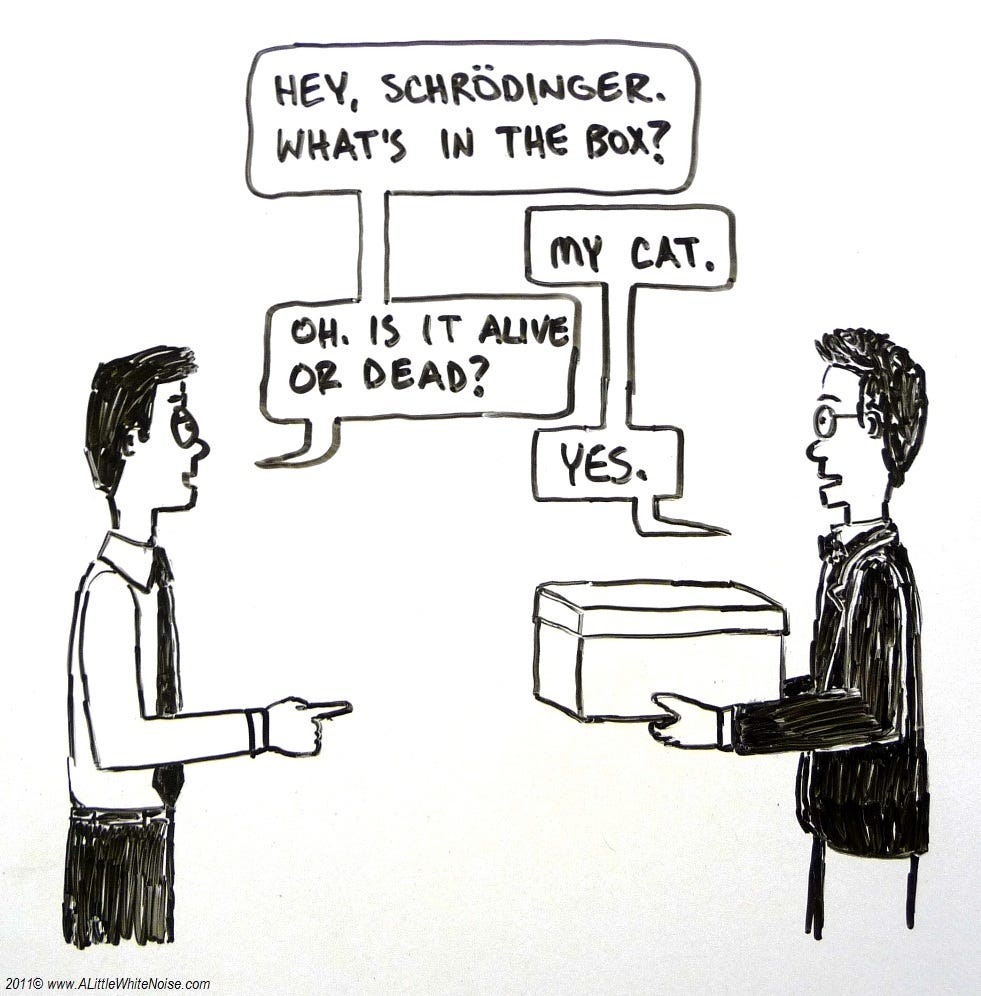
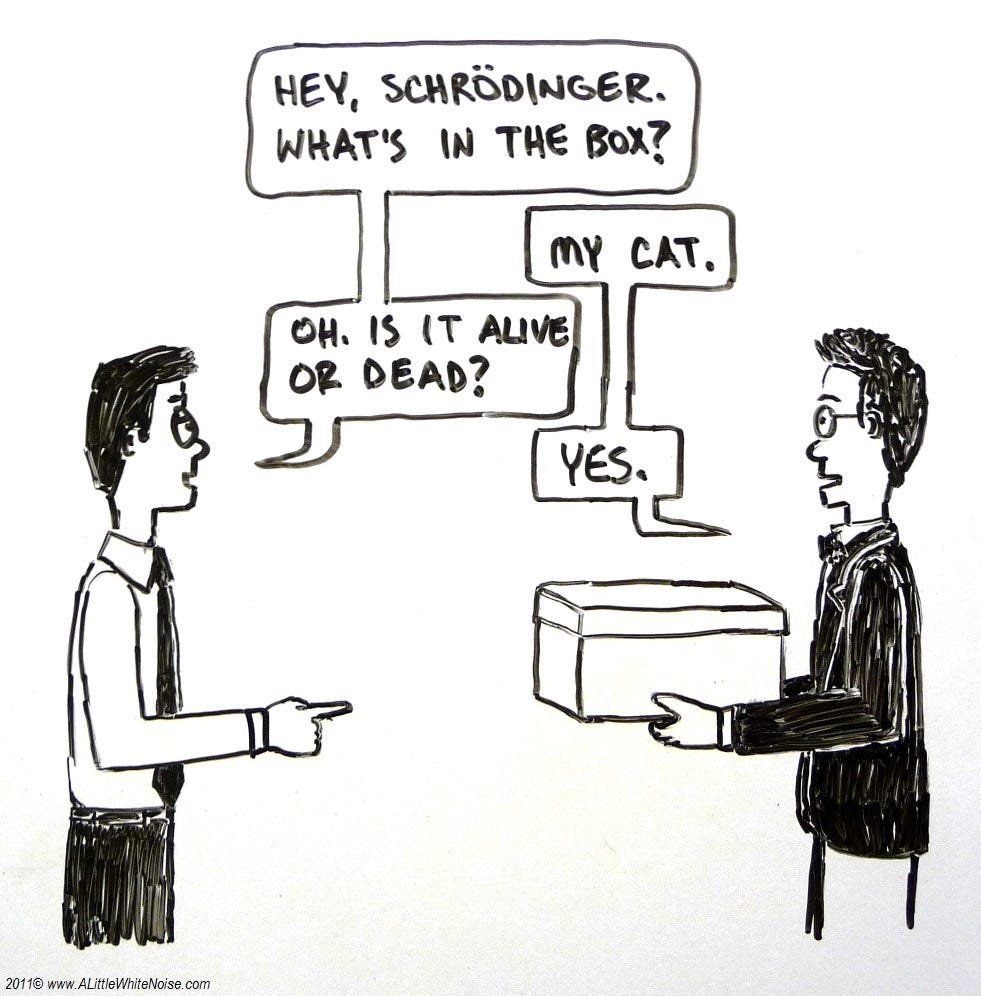
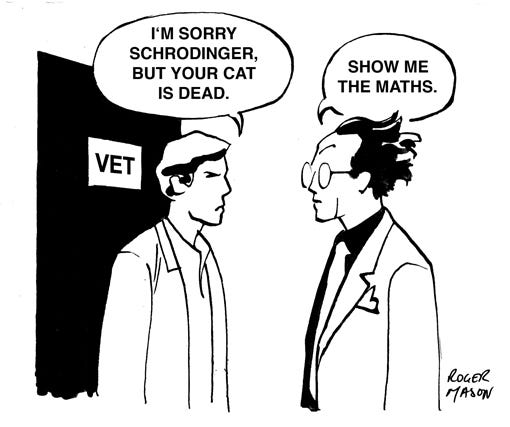
Schrödinger’s Cat is a famous thought experiment highlighting the observer effect in quantum physics. If a cat is in a box with poison and has a 50/50 chance of surviving, the cat could theoretically be alive or dead, or both, until someone looks inside the box and checks.

Just like Schrödinger’s Cat, your research could be useless, impactful, or both — but it just isn’t anything until someone looks inside the box.

An Argument for Waving Your Research Around Like A Fucking Flag

Companies like Facebook tie promotions and raises to “impact” employees have upon the project for a reason. Though this approach has a few downsides that I’ll explore in another article, it does prompt researchers to tie the impact of their research to specific product changes.

When this works well, it incentivizes researchers to more proactively share their findings and follow through on areas of interest with design and product management to make sure improvements ship.

When you have a bad case of Schrödinger’s research, this may mean you can’t prove you’ve had any impact at all on the product.

This article will cover the few major steps in ‘socializing’ your research — or proactively bringing it into the design or decision making processes.

In general, we socialize research for a few company-wide benefits:

  • So the product is inspired by the user — user experience research findings shared early on in the design process can inspire elements of a design. This changes your product design process from “guessing and checking” to something more human centered.
  • So the product team makes better decisions — if designers and product managers are aware of the limitations and preferences of their user, they’ll make better UI and interaction decisions the first time through.
  • So the user becomes the ‘judge’ — teams that make decisions based on user experience research are less likely to steer towards what they personally prefer at the expense of the user. This also makes creative decision making more methodical by deferring to data rather than individuals on the design or management team.

Common Causes of Schödinger’s Research

Your team’s research blindness may be caused by any combination of: lack of awareness, ignorance, contempt, day drunkeness, or lack of bandwidth.

More likely though, there’s a problem with your method of communicating your findings.

  • Your method of presentation is boring or hard to absorb ex. dull, text-heavy slide decks or tons of confusing charts.
  • Your distribution channels suck — ex. overcrowded Slack channels, un-used Wikis, un-navigable document folders.
  • Your stakeholders don’t know the benefit of UX research ex. they view research as a yes/no nod on a design, they’re sure they know what’s best for the user.

Show Me What You Got

Even if your research is great, pertinent, timely — it still doesn’t speak for itself. User research, especially at a large company, is a role that requires the researcher to act as a spokesperson and mouthpiece for the user.

Here are a few ways that you can better share and promote your research findings. If you have other methods you employ, please let us know more about them in the comments!

Make Your Findings Interesting & Usable

Above all, the information you communicate must be accurate and given the correct context (ie. sample size, statistical significance).

But once you’ve nailed accuracy, make that shit as colorful, eye-catching and incendiary as possible to get people to read and absorb it.

Here are a few tips on effective slide decks from: UX Research is Boring and Nobody Reads It.

  • Use colors and themes to help stakeholders identify what information the research covers
  • Include a TL;DR and Recommendation slide as an index and for skimmers
  • Don’t just include that an element worked/didn’t. Tell the reader WHY

Make Your Research a Reference

If your research is unfindable, it can’t be used.

I create a research “Directory” for each product I work on with a team and circulate the link with pretty much everything I share. The Directory serves as an index of links. In the Directory, I include the following:

  • Description of product — Work with the product manager to come up with a brief description of the product and its basic functionality. Include a picture if possible.
  • Description of use case / user’s need — Briefly sum up what you know about the specific user and task at hand.
  • Primary Research Questions — What stage of research is this team at? Are we checking concepts against each other? Already fine-tuning usability? Just identifying areas for improvement of efficiency on an older product?
  • Links to Research and Design Resources — Include links to foundational research on user type/demographic trends, or the task the product approaches. Include usability test reports, noting the date and what part of the product was tested so stakeholders can jump to relevant data. Include any live test data
  • Upcoming Studies — I list my upcoming research and information on how to watch online or attend. I try to invest time in getting team mates to watch research because it means better understanding, people to bat around thoughts with, and fewer corrections down the line.
  • POC Information — List points of contact and contact information for engineering, design, product management, data and any other main stakeholders. This can help keep you from becoming the hub of all interactions.

Bring Your Research Directly To Your Stakeholder

I employ three main methods of sharing my research directly with peers.

1:1 Meetings

When I work on product teams I generally meet with the product manager once a week to gauge progress and priorities. I also meet 1:1 about once a week with the designers I work with to look at their most recent work and discuss edge cases and assumptions/concerns to explore in upcoming research.

1:1’s or small group meetings are also an excellent time to introduce the research you’ve just completed. You can answer questions and explore individual follow-up — for example, if a designer will need to re-think an interaction based on user research, you can let them know to plan extra time in their schedule to addres.

Research Read Out is a Terrible Name

Though I haven’t found a better way to refer to collecting people and sharing my research, Research Read Out is a deadly boring title for something awesome.

For each big research report (ex. a diary study or a set of surveys that reveal a trend) I like to organize a read out to share findings with context and answer questions.

Schedule 45 minutes to 1 hour. Ensure you have video conferencing set up, share the link, and record the session for those who cannot be there. Go through your report slide-by-slide, adding a bit of color or real examples to provide context. Photos and video clips from testing are your friend.

Because I like to multitask and the audience is captive

I also use these sessions to assign work or formally call issues out to add to our development or design timelines. I ask people about future availability and put time on the calendar so we remember to follow up.

Don’t be scared. Jokes helps when you’re being this direct. So does owning up to your approach and your intensity.

Speaking up and sharing your research can only help you and your user. When people react negatively to my action-oriented approach, it is to critique my personality rather than my accuracy or effectiveness. A grown woman can survive some shade, especially when my products end up shipping and numbers go up.

Insert Your Findings in the Design Process

User research shouldn’t be conducted in a vacuum. The researcher can work hand-in-hand with the rest of the product team to make sure that the user is at the center of the whole process.

Here are a few of my favorite ways to inject your research and knowledge about the user into the the design process.

Run a Sprint

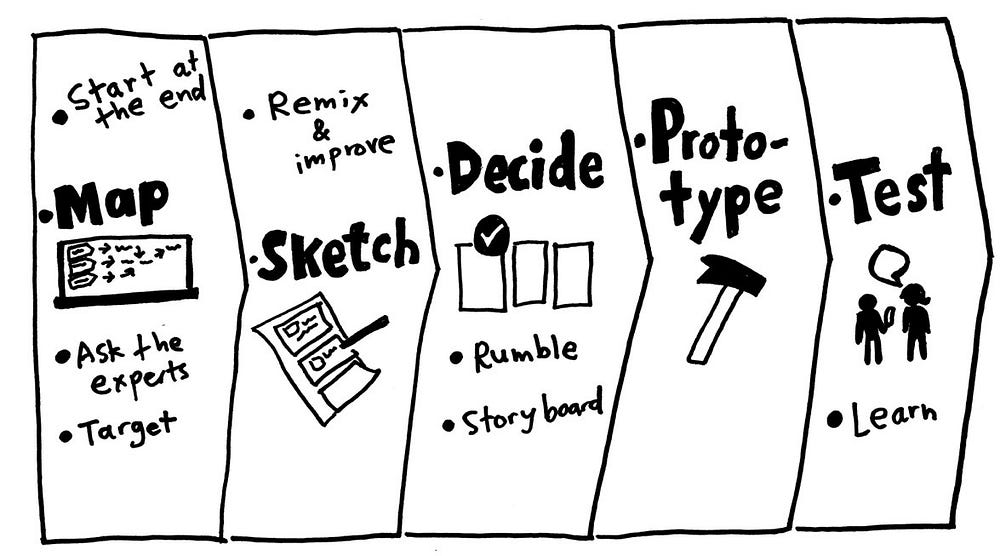
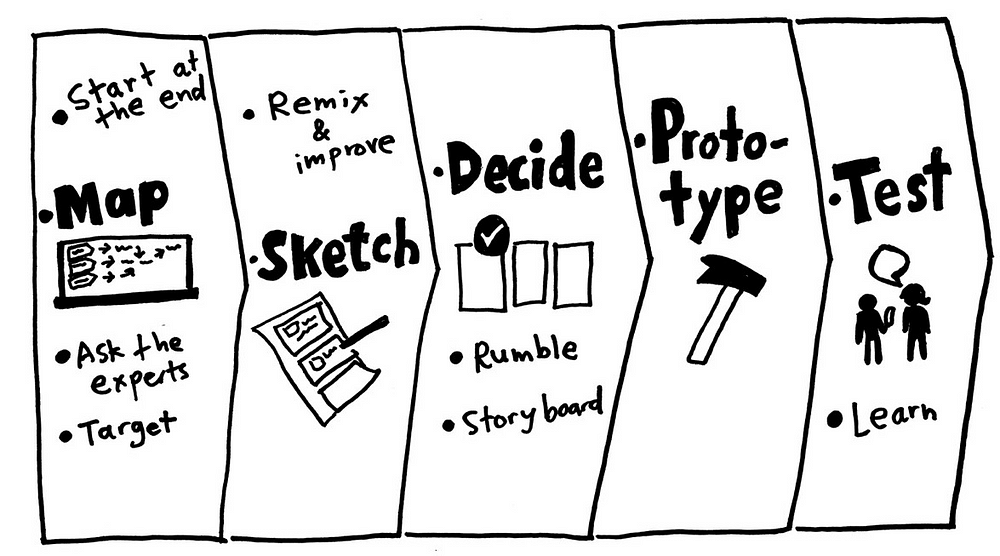
Once you’ve got a nest of related issues, (for example, all kinds of reports of issues with the login process), it could be time to recommend a design sprint to address the whole section.

Work with the design team to insert user research into the sprint. I like to start sprints with a brief overview of our background knowledge on the user, their preferences and limitations.

When I have the time to get really fancy, I incorporate a quick round of user testing into the end of a sprint so designers can see reactions to the earliest sketches of their work and adjust accordingly.

Get Brainstorm Priorities Right

When your team is planning their next round of work or next set of feature priorities, jump in and insert some research.

Start brainstorms off by listing user needs and user priorities, then discuss company goals and metrics. If you ask your design team to just jump in and “maximize new signups”, you run the risk of designing predatory dark patterns.

“How might we satisfy (USER NEED) in a way that (COMPANY PRIORITY). “

Insert Your User Into Decision Making

Ideally a team is on the same page when it comes to priorities and what gets recommended for build or shipping.

The user researcher’s responsibility is advise the design, check impact with data, and above all, help you user achieve their goals.

As such, feel empowered to speak up in decision making meetings to point people towards relevant data or knowledge that you think is important to know about the user.

For example, if the product is about to ship but you have concerns about people misunderstanding, it is okay to pump the brakes and point people towards the data that makes you feel that way.

In fact, it is your responsibility :)

Share What You Know

Do you have tips or ways you’ve effectively shared your research findings? Please tell us about them in the comments below!


from Prototypr https://blog.prototypr.io/if-nobody-reads-your-research-did-it-really-happen-815bfca103ca?source=rss—-eb297ea1161a—4

This Is What A Designer-Led Social Network Looks Like

The users of the social networking and research site Are.na have a hard time explaining what exactly it is. You could call it “a collection of digital meta-theses” or “playlists, but for ideas.” Some say it’s what would happen “if the French created the internet,” or that it’s “like nerdy Pinterest.” But perhaps the best way to explain the website’s ethos? “Social media for people who dislike social media.”

The site, which was created in late 2012 by a group of artists and designers intent on creating a space that they could use to incubate ideas over time, has no advertising and no tracking. It has a feed, but there are no algorithms dictating what you see or when. It is a digital space to collect images, text, links, and documents, but what you collect on the site isn’t about popularity: There are no “like” buttons. That’s because it was created by designers and artists who are attuned to good, ethical design, making it something of an anti-Facebook social network by creatives, for creatives who want a space online in which to think, gather their ideas together, and share them with others.

[Image: Are.na]

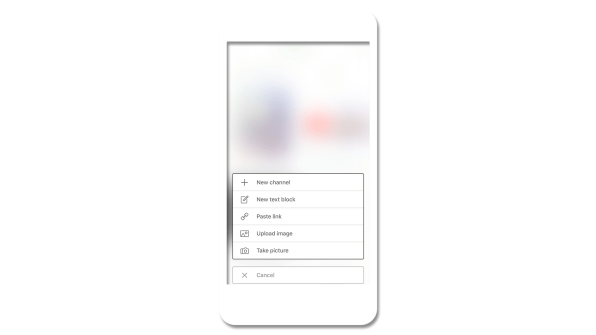
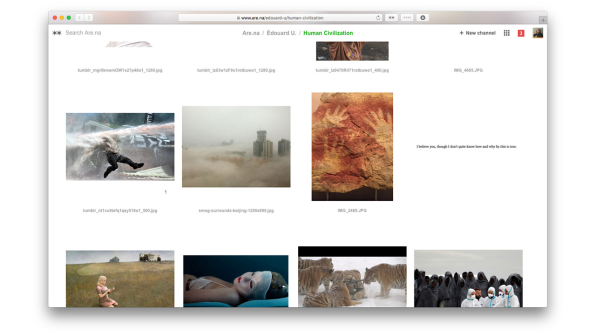
This difficulty in describing exactly what Are.na is has become part of its allure–“blocks” of content reside within folders called “channels,” and can be connected to as many channels as users want, creating a network of images, links, and text. On the site, there are even channels for crowdsourced descriptions of how to describe Are.na at a party and a channel for all the different ways in which people use it. For instance, one user keeps channels as reading lists, playlists, and as a portfolio for his work.

[Image: Are.na]

The platform’s lack of a simple explanation is perfectly suited to an era when more people want something different out of the internet. In the groundswell of anger and suspicion toward social media platforms like Facebook and Twitter for spreading misinformation, amplifying harassment, and stamping out nuance, Are.na feels like a necessary antidote–a calm white space where you can group your ideas, whatever their form or complexity. And while the site’s user base of 21,000 registered users and 7,000 active monthly users is minuscule compared to the social media giants, it is growing rapidly at 20% month over month.

“What does it feel like to connect to the information you’re consuming and feel like you’re building new thought in the same way that you would in a really good conversation with a friend or reading a good book, one of those human things that expand our brains?” says Charles Broskoski, Are.na’s cofounder. That, in essence, is Are.na’s goal: to make it easier for that kind of intelligent connection to happen online, replacing the passive consumption that manifests in hours spent mindlessly scrolling and “liking.”

As Broskoski put it, “[Are.na] is less like a casino and more like a nice library.”

[Image: Are.na]

No Ads, No Algorithms

On first glance, Are.na’s sparse website feels a little bit like Pinterest, except you can add more than photos. But for Broskoski, there are some fundamental differences: Pinterest focuses mostly on images, primarily of things that you can buy. It’s trying to sell advertising, while Are.na is not. Are.na’s freemium business model is central to the company’s ethos. You can sign up for Are.na for free and start creating blocks of content and folder-like channels, as long as they’re publicly available. But if you start to create larger private channels–which indicates to the Are.na team that you’re using the platform for bigger personal or professional projects–then the platform costs $5 per month, or $45 for the year.

“We think the business model is a fundamental thing that forms the user experience,” says Chris Barley, a cofounder and designer at Are.na with a background in architecture. “If we’re trying to have our users look at ads, that’s a different desire than giving them a space to work intellectually.”

Because the company isn’t trying to keep eyeballs on the site so it can sell more ads, the underlying mind-set is simply different. “We’re trying to set up this situation where we’re motivated to make people like the platform enough to pay for it,” says Broskoski.

Many social media companies that rely on ad revenue preach connectivity, positioning their service as the means to overcome the vast differences of time and space to share ideas and create a global community. This rings false, of course. These companies are motivated to connect you with friends and strangers because they can convert your attention into dollars. That’s part of what’s driving the backlash against Facebook and Twitter. “There’s a fundamental disconnect there,” Broskoski says. “We’re trying to make a company where that is actually the goal. We’re trying to build a normal business. If it’s useful enough then people will pay for it.”

The commercialization of the internet–partially to blame for the disconnect between the techno-utopian ideals of its earliest creators and its current state of affairs–was the reason the team created Are.na in 2012. Broskoski explains that in the early aughts, he and many of his friends were partial to an internet bookmarking site called Delicious, but when Delicious was bought by Yahoo in 2005, they decided they needed to create a tool of their own that wasn’t owned by a giant corporation–and Are.na was born. “Because we were artists and working on the internet, a lot of our practice had to do with searching out weird idiosyncratic things and going down the path of what we were interested in and then tying that to a thesis for a work,” Broskoski says. “The thing we wanted to do was collect all the resources we found in the world that felt important to us at a time and have a way to gather all that stuff into one place.”

At first, the site was mostly for Broskoski and a group of friends with similar mentalities. That was five years ago. Today, as paranoia about algorithms, data, and digital privacy rises amongst users of major social networking sites, Are.na might stand a chance with the rest of the world. “The cultural awareness of what people want out of the internet is changing and growing,” Barley says. “In other industries or areas that are not digital, health and wellness is a huge concern. But figuring out what that might mean in our digital lives is a more and more important space.”

Are.na’s designers have felt this disconnect online for many years, long before the 2016 election shook many people awake. “Designers and artists are those early-adopter types, and they’re more sensitive to how things get presented to them on the internet,” says Are.na cofounder and designer Chris Sherron. “They felt it as soon as Facebook introduced the like button. As soon as people started trolling on Twitter, they felt it.”

[Image: Are.na]

Trusting Users To Figure It Out For Themselves

As a designer-first site, Are.na’s web design is serenely white. It’s a bit confusing at first (in part, because there are so many ways you can use it), but when you try your hand at creating blocks and channels it quickly becomes intuitive. “I think a lot of current social networks don’t put enough trust in the user to think for themselves and in a way they overdo it in terms of the style, the colors, the language–you notice a lot of sites that use this real jokey and playful language,” Sherron says. “I think designers and artists who are the early adopters of the internet and the ones that set the trends–they’re seeing this and thinking, it doesn’t feel quite right. We want to make sure that we’re not taking people’s intelligence for granted and doing just enough.”

The challenges of the site–both the difficulty describing it and the vast number of ways you can use it–is also by design. “Part of the reason [Are.na] takes a little longer for people to get into is that it asks a little bit more of a user than something like Facebook,” Barley says. “The like button is the most mindless thing you could possibly do. What you do on Are.na is connecting, and it takes a lot more brain power. You’re marginally smarter for doing it and you build that muscle over a period of time.”

[Image: Are.na]

The company has found that a key draw for many users is the ability to work in small groups on the site–making it part social media and part productivity tool. Barley describes using Are.na for research, where three to five people collect and group information thematically into channels for everyone to reference. He joined the team about six months ago because he’d been using Are.na in a previous job. “It lets you have a thought over a long period of time and discover things slowly, rather than quick inspiration,” Barley says.

The platform has found a home in the classroom at universities like MIT, Yale, RISD, Parsons, Pratt, and Columbia, where professors and students have embraced it. Outside institutions are also using Are.na: The Chicago Architecture Biennial embeds content from the site on its blog, and the Guggenheim has built an entire interactive exhibition using Are.na as the content management system. And creative people who work at companies like Apple, Google, Tumblr, and Dropbox also use the service–which likely spills over into their professional work lives. Broskoski says that a recent user survey showed that 80% of people used Are.na in both personal and professional contexts. “It’s people who value intelligence throughout their day, both when by themselves and at work,” Barley says.

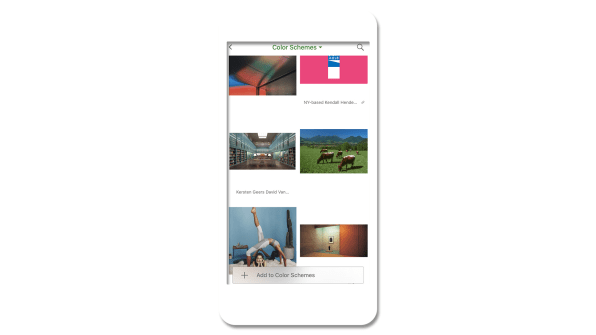
In 2016, the team built a bookmarking tool called Pilgrim that’s available for anyone to use, with Are.na as its backbone. At the end of 2017, they launched an iPhone app, a big step forward toward helping the platform grow and a common request from current users. And as the site enters its sixth year, its creators are hoping to double down on how Are.na can be used in team settings–something they’re already intimate with, given that they also use the platform for internal projects. What would Are.na look like if used in a larger context, like in a big corporation? “Those implications are really interesting if you think about entire companies slowly building ideas together over time, versus what they do now–these siloed brainstorm sessions that they push out on people,” Barley says. But even as they grow, the Are.na team is focused on their core user–which is, in essence, themselves.

“Making things that give dopamine hits for nothing is not what we’re trying to do. It’s usually in the service of thinking better and thinking with other people,” Barley says. In other words, they’re going to keep creating an ethically minded internet platform that puts its money where its mouth is. “Ethical might be one word,” he adds. “It’s our best guess about what we think people actually want now, and more of what people will want from the future.”

from Sidebar https://sidebar.io/out?url=https%3A%2F%2Fwww.fastcodesign.com%2F90157216%2Fthis-is-what-a-designer-led-social-networking-site-looks-like

UX audits and their importance in the design process

When getting started on a new design sprint it can be easy to want to hit the ground running by sketching or drafting wireframes, but an important first step that can sometimes be missed is the UX audit.

What exactly is a UX audit you might ask? When I say UX audit I am referring to the surveying the competitive (and sometimes not-so-competitive) landscape — seeing what others are doing, how they are doing it, and, potentially, why they are doing it that way.

UX audits are an important step in the design process because they allow the designer to:

  1. See what the landscape is like for a particular component or workflow. How are others doing it?
  2. Identify what works, what doesn’t, and what might be missing. Where is there opportunity for improvement?
  3. Understand what’s considered “best practice” and why. Why reinvent the wheel if there is already a standard convention that users are familiar with?

But auditing is not as simple as browsing the web and taking mental notes of what you see. As designers, that’s something we do all the time anyway. When actually conducting an audit, you need to keep a record of everything you’ve looked at to see the big picture. Insights and recommendations should come from documented findings, not fuzzy memories.

So how should you conduct a UX audit? I’ve outlined my steps to complete a successful audit below. These should help in your research and development of user-centered components and workflows.

1. Figure out what you’re auditing

Are you auditing a component like buttons, search boxes, or date pickers? Or maybe it’s something more complex like an account creation flow? Either way, nailing down what it is exactly that you’re looking for will help you stay focused with your audit.

2. Figure out who you should audit

Are you designing strictly for enterprise or is it consumer-facing? Or maybe it’s for something geared toward teens? While you’ll want to look at a mix of websites and apps to help understand best practices, you should definitely spend some time looking at other players in your space as well. There might be trends by industry, demographic, or device that you need to pay attention to.

I like to get as big a sample size as possible, but depending on what I’m auditing that might not always be possible. If what I’m auditing is more of a common component, I’ll try to target a pool of 10–20 samples (using a combination of apps, websites, and/or operating systems, depending on what I’m auditing).

3. Screenshot everything

Shift + Command + 4 is your new best friend. You’ll want to grab a screenshot of everything you see — every state, every page, every interaction. This will make it easier to remember and document for others later. If you don’t do this, I guarantee you’ll go back and end up doing it at some point later, so you might as well do it now.

I like to organize all my screenshots into a folder, organized by product, so I can refer back to them when putting together my research into a final document. File organization is easy to overlook but a true time saver in the end!

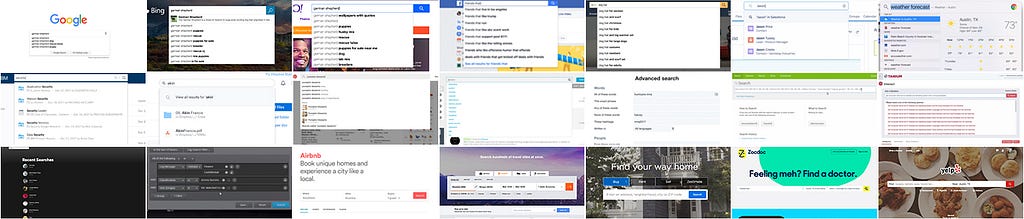
Capture everything you’re auditing with a screenshot

4. Review everything you’ve captured

By now you’ve looked at at least 20 apps or websites, if not more (because chances are you didn’t find what you were looking for at each place you looked).

It’s hard to remember what was what, who did what and in what order, so take some time to review what you’ve screenshotted. Looking through all your screenshots will help you prep for the next couple of steps.

5. Organize into buckets

See what categories emerge when you start to organize your samples into buckets. What features does each product have? What characteristics or traits are common?

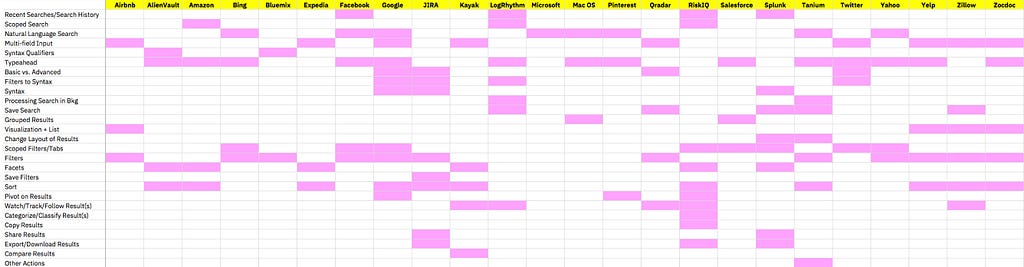
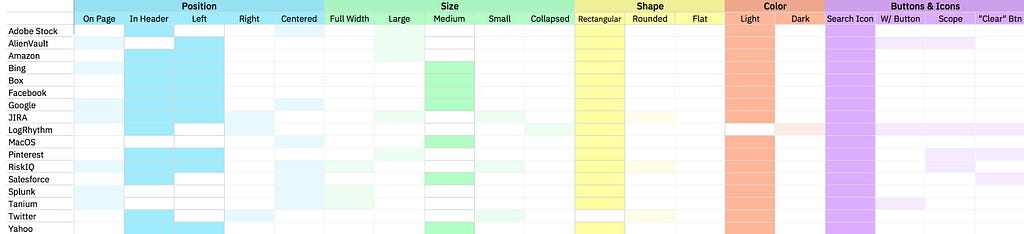
I’m not typically a big Excel fan, but a spreadsheet definitely comes in handy here. I’m also more of a visual person, so being able to see a breakdown that way can help with understanding too.

Breaking down search features by product

6. Look for patterns

Use your matrix you’ve created to look for commonalities. You’re basically using it as heat map of sorts to help surface patterns. These patterns can help you determine what is a common convention that users are already familiar with.

Emerging patterns from characteristics of a search box component

7. Document and synthesize to share with your team

Now that you have some insights and recommendations you might want to share it with your team; this can help them understand why you made certain decisions. Formats for your audit documentation can range from a Keynote presentation to something more like a UX framework guideline, depending on what works for you.

Even if you don’t end up sharing it immediately, creating a document that can be referred to later is extremely valuable for future-you and/or other designers on your team, saving them from the re-work of having to conduct their own audit.

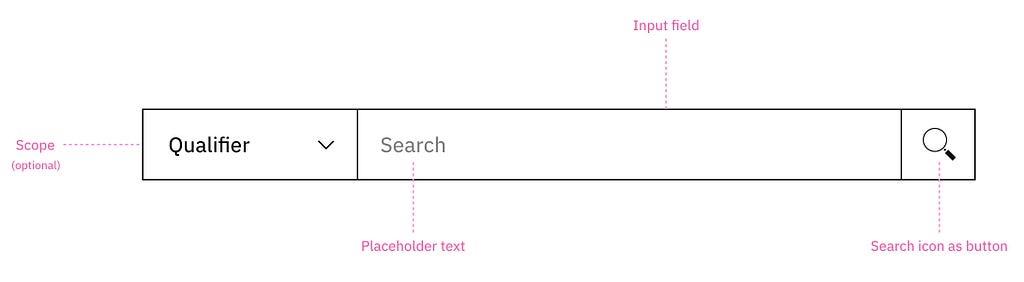
And remember how initially you figured out what you were auditing exactly? Well now that you have all this information, it might be a good time to actually define your component or workflow so to set the scope of what something like “search” actually means. For others reviewing this later, extra clarity can be extremely helpful for understanding and alignment.

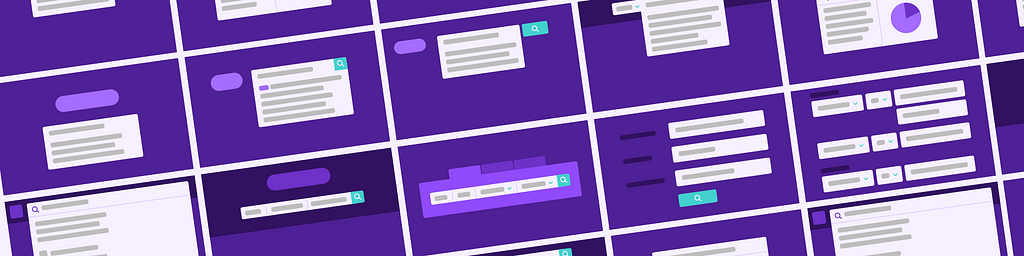
Basic anatomy of a search box component defined

8. Use what you’ve learned

Make use of your new insights to inform how and what you do for your product and users. Test your designs, iterate if necessary, and always keep an eye open for changing trends!


UX audits and their importance in the design process was originally published in UX Design Collective on Medium, where people are continuing the conversation by highlighting and responding to this story.

from UX Design Collective – Medium https://uxdesign.cc/ux-audits-and-their-importance-in-the-design-process-55264e55ffd1?source=rss—-138adf9c44c—4

UX & Psychology go hand in hand — Introduction to human attention

A handy article about human attention from a psychologist’s and a UX Designer’s view.

As a UX designer, we design digital products that people interact with. When we designing these products, we spend a lot of time on different research to understand the behavior, habits, and needs of our users. However, there is a couple of general patterns that characteristic of all people. To be consciously used, we need to understand the process of human cognition.
The purpose of this article is to understand the concept, function and types of visual attention and to use this knowledge in everyday product design.

What does psychology say?

In this section one of my friend, Anikó Tőzsér helps us to clarify the basic principles of human attention.

What determines what we pay attention for?

Attention is an ability which helps to select the information between different stimuli and process. Our attention can decide that we want to deal with the stimuli or ignore it. Sometimes this process is automatic and sometimes we focus our attention on a problem which we have to solve.

Psychology of attention deals with mechanisms of perception which form the behavior, and how consistent behavior is created. Psychological researchers of attention concentrate on audition and sight.

Spatial attention vs feature-based attention

There are two ways of visual attention: spatial attention and feature-based attention. Spatial attention means that we direct our attention to a particular region. Feature-based attention means that we direct our attention to a particular feature, for example colour.

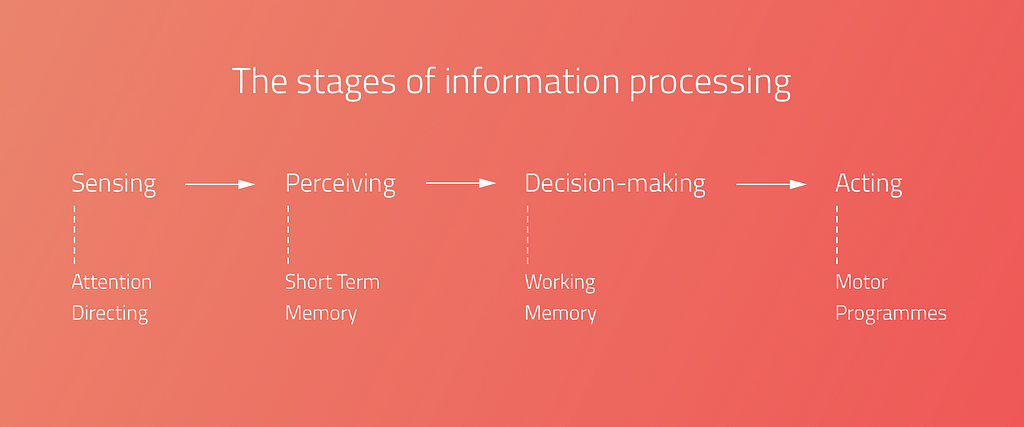
Human Information processing

For the sake of design products, which grab people’s attention, we need to understand the processing of human information.

However this is a debated issue.

  • When one period is finished, the next one starts, and the periods contain more and more complicated feature of the stimuli.
  • Others argue that it’s continuous, which means that every stimulus is transmitted immediately.

Types of attention

There are different types of attention, which are determined by the situation and the intensity of the stimuli.

Selective Attention: it is an automatic process, which chooses between important and less important stimuli depending on the situation. As we can attend to only one thing at the same time, this kind of process helps to select the most important stimuli in the given situation.

As a UX designer we need to be aware of the fact of intensive changes: intensive changes of the environment draw the user attention. With this fact under our belt, we can consciously design user experiences that truly fit the users.

Divided attention: if a process is automatic, more process can happen simultaneously. A great every day example is driving and talking at the same time. We can pay attention only to one action at the same time, that’s why if something happens on the road in front of the driver, the driver will stop talking and concentrate on the driving. In this moment the attention becomes Focused, when the attention is limited to one object, action or stimuli.

Focused attention is the brain’s ability to concentrate its attention on a target stimulus for any period of time.(cognitivefit)

Sustained Attention: Sustained attention is when we keep our focus on one subject for a long time, even if we need to repeat the given action or activity.

As a UX Designer, we need to know that during the learning and working activities (listening to a teacher or reading an online lesson) the users need to use their sustained attention. It means that everything on the user interface should serve this goal.

Attention is a limited cognitive resource

As a UX designer we need to reduce cognitive overload.
Each sense modality has some separate attentional resource. An auditory task interferes less with a secondary visual task would.
”It is much easier to monitor the road ahead while talking on a cell phone than when looking at the navigation system.” (Visualexpert)

In one moment 5–9 (7+-2 The magical number) objects can be detected, which means that the area of spatial attention is not constant, it can be broader or smaller.

Cocktail Party Effect:

Cocktail party effect is the ability to tune into a single voice and tune out all others during a crowded party. This also could happen in the digital environment. Web party effect is the cocktail party effect in the web environment.

As Dr. Susan Weinschenk explained in her article, you can use the senses to grab attention. Colours, contrast, fonts, white spaces, beeps, and tones are helping to capture attention.

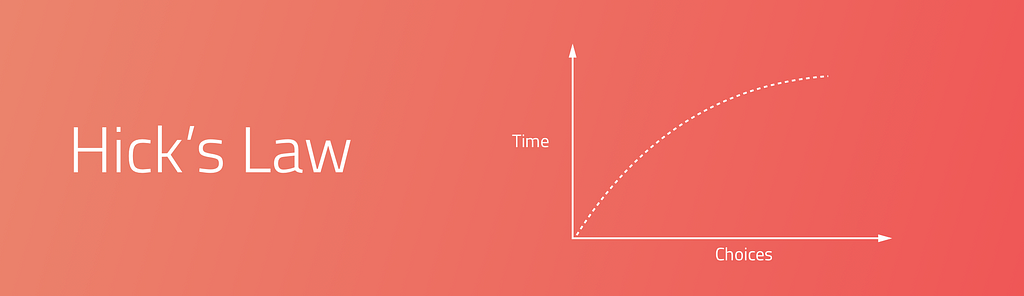
Too Many Options (Hick’s Law)

More choices need more cognitive load. “It describes the time it takes for a person to make a decision as a result of the possible choices he or she has: increasing the number of choices will increase the decision time logarithmically.”

Change Blindness

Depending on our focus, our brains can be fully blind to changes going on around us. We need to design our products according the main user goals and tasks. UX is a treasure box full of with useful methods and techniques. Creating user journey map or conduct task analysis could help us to avoid the ‘change blindness’ effect.

Thank you! ❤️


UX & Psychology go hand in hand — Introduction to human attention was originally published in UX Design Collective on Medium, where people are continuing the conversation by highlighting and responding to this story.

from UX Design Collective – Medium https://uxdesign.cc/ux-psychology-go-hand-in-hand-introduction-to-human-attention-a70ffd2c4289?source=rss—-138adf9c44c—4

Chermayeff & Geismar: 60 years of logos

Honoring Chermayeff & Geismar: 60 years of logos

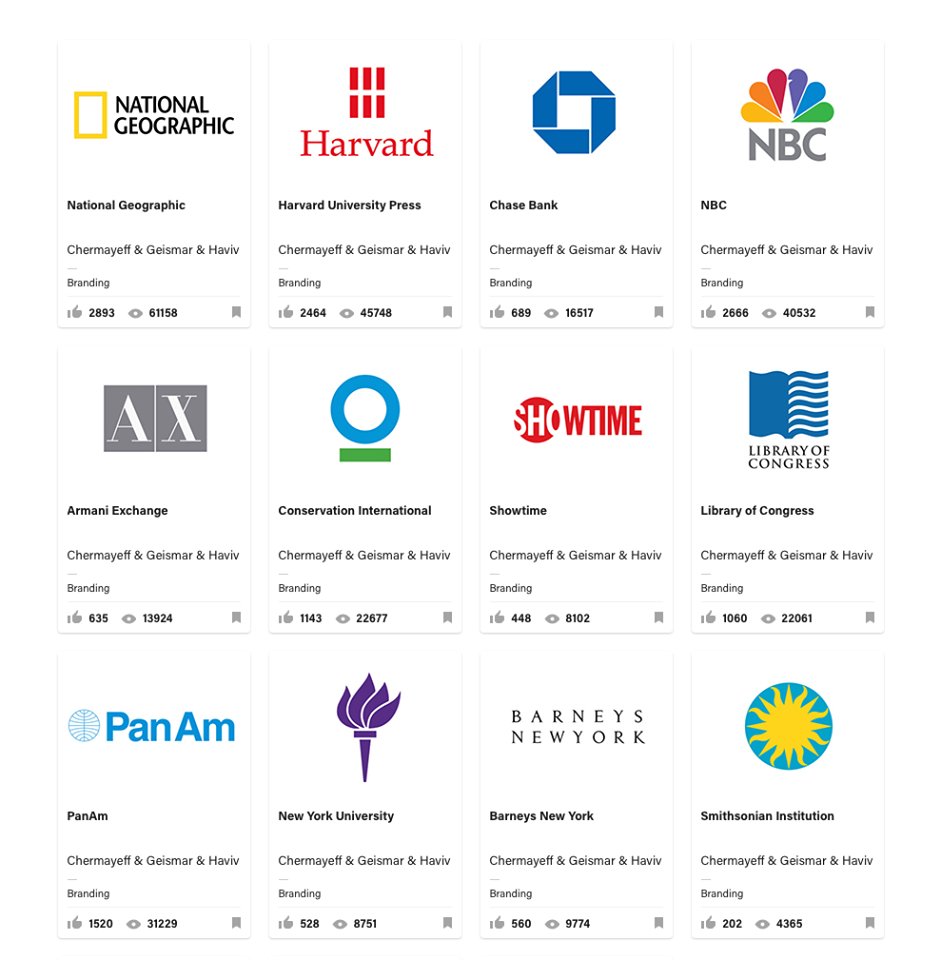
This year, the world of logo design has lost one of its most prominent representatives, Ivan Chermayeff. In the odd case you don’t know who that is let me break it down for you really quickly. 60 years ago this man, Yale graduate, along with his Tom Geisman, founded the legendary firm Chermayeff & Geismar. It would become to be known as the creators of logos for such companies as Pan Am, Chase Bank, NBC and Xerox; channels such as Showtime and National Geogrpahic; and brands like Armani Exchange.

Chermayeff & Geisman

In 1979  Ivan Chermayeff and Thomas Geismar were awarded the AIGA Medal and in October 2014 they received the National Design Award for Lifetime by the Smithsonian’s Cooper-Hewitt, National Design Museum. Since, 2006 another designer joined forced in the firm, as a partner, Sagi Haviv. Apart from logos, they also deal with motion graphics and art in architecture.

Unfortunately, Chermayeff died this year, on December 3rd. He left behind a true legacy that will most likely be continued by its remaining two partners.

This is the man that said: “It is usually a two-month process, but it should look like it took five minutes.” That’s exactly what everyone in the business knows to be true. Only they’ve been doing it so successfully for 60 years, and counting.

To honor the two pioneering professionals, Dan Covert of Dress Code created the video below, which also features the last interview Ivan Chermayeff gave. The world of design has definitely lost a legend.


The post Chermayeff & Geismar: 60 years of logos appeared first on Tshirt-Factory Blog.

from Tshirt-Factory Blog https://blog.tshirt-factory.com/chermayeff-geismar-logos.html

Framer Launches Fresh New Design Tool


Framer is known as a prototyping app, but in an unexpected move they have just announced the launch of a fully integrated, browser-based, visual design tool.

Aimed at creative professionals, the new Framer is designed to rival established options including Creative Cloud and Sketch, new kids on the block Affinity and Figma, and is timed to steal the thunder of InVision, whose own much heralded design app is expected next month.

We’re betting on something that our competitors aren’t — that designers will want a tool which does both high-fidelity design and prototyping.

—Koen Bok, co-founder, Framer

Framer claims that this latest release makes it the first prototyping app to fully consolidate the entire designer toolkit—at least for screen based design.

The new app allows you to design everything from icons, through to hi-fidelity interactive mockups. Unlike some competitors, who are promising the moon in 2018, you can use Framer’s design tool now. The not unfamiliar interface is simple to use, and initial reactions have been broadly positive.

Framer’s approach has been a little…interesting, to put it succinctly. They have integrated AI [facepalm] so that you design something once, and Framer ‘intelligently’ reshapes and resizes the design across any device. I’m not saying this is a dubious approach, I’m not saying that responsive design is about more than making shapes fit a viewport, I’m not saying that this goes against a mobile-first methodology; I’m not saying any of that because we should be positive about any new tool that people have worked hard on.

Perhaps the best news for designers is that the tool is being released at all. We all saw the stagnation in design apps—and the corresponding impact that had design work—when Adobe was the only player in town. The more companies are forced to compete to win your custom, the better the tools on offer. It seems that 2018 could feature a design tools ‘space race’, with a dozen or more developers vying for an established slot in designers’ workflows.

Framer’s evolution into a full design tool, is on the one hand ambitious, and on the other inevitable. Framer won’t be talked about as an Adobe killer, it’s a different beast altogether; it may be that designers anticipating InVision’s new tool are tempted away. A creative process is a very personal thing, some designers will love Framer, others will not; it’s always nice to have a choice.

Framer is available now as a 14 day free trial, plans start from $12 per month.


from Webdesigner Depot https://www.webdesignerdepot.com/2017/12/framer-launches-fresh-new-design-tool/

The golden rule of A/B testing: look beyond validation

A/B tests provide more than statistical validation of one execution over another. They can and should impact how your team prioritizes projects.

Too often, teams use A/B testing to validate bad ideas. They make minor changes and hope the test will produce big wins. But these tests can be counterproductive. Results that are a product of random variation (e.g. not statistically significant) yield unhelpful insights, and even good results are not guaranteed to hold true when your winning variable is shipped to a full audience.

If you adhere to A/B testing best practices and ask the right questions before running a test, you’ll learn what types of changes are actually worth your time and focus on projects that produce meaningful insights.

The impact of statistical power

There’s a lot written on frequent A/B testing mistakes. The most common error is calling tests too soon based on statistical significance. Sometimes your test result is significant because there’s an actual effect, other times it’s due to sheer noise. After all, a random sample is never going to be a perfect representation of the full population.

In order to differentiate an effect from noise, you not only need statistical significance but also statistical power. If you have more statistical power you can be more certain the lift is actually real.

To get enough power and run a test correctly, ask yourself:

  1. How much do you think the change will increase the associated key performance indicator (KPI)?
  2. Given this desired effect, how long will you need to run the test to get accurate results?
  3. Is it worth the wait?

1. How much do you think the change will increase the KPI?

Say you want to improve your signup flow. You have a list of ideas and are trying to decide which ones to work on. You’re not happy with the UI, but a complete overhaul will take a month to design and build. On the other hand, you could try out a different color scheme, which won’t take long to change. Your team hypothesizes that the complete redesign can boost conversion from 10% to 15% whereas the color scheme change may boost conversion from 10% to 11%.

2. Given this desired effect, how long will you need to run the test to get accurate results?

Take your answer to the question above and plug it into this sample size calculator. Under the hood there’s serious statistics involved, but the basic logic is smaller effects take longer to detect whereas larger effects will be obvious sooner. This is an important insight: detecting small changes is expensive. In our example, the color scheme change only takes two days to build, but we’ll need 24x more data to test a 1% versus a 5% absolute lift.

3. Is it worth the wait?

With sample sizes in mind, you should consider how long a test would need to run to achieve reliable results. Say your signup flow gets 600 visits per day. The complete redesign will require two days to gather enough data while the color scheme change will take much longer. So the larger project takes 32 days to develop and test, while the smaller project takes 49. They both take a lot of time, but the complete redesign has more potential.

Focus on projects with bigger potential upside

Late last year, we thought our signup flow could do better. The layout on our previous signup page (shown below as the Control) was not logically organized. The integration methods were not displayed in an order that was most likely to be relevant to new users. And since our signup flow doesn’t see hundreds of thousands of visitors, we knew we had to test something that we thought was much better.

We wanted our signup conversion to increase by 10%. And after getting enough data, we looked at the signup rates between versions. Disappointingly, the difference was small and not statistically significant. The test was a wash, but that’s okay. We still decided to use the new version, because the signup experience was cleaner and put us in a better position to iterate and improve in the future.

What this approach means for startups

For young companies, small optimization projects just don’t make sense. Tests take a long time to run and distract you from working on projects that matter. You might see a slight uptick, but you’re likely working towards a local maximum. To get on the path towards the global maximum, young companies need to make big changes.

Larger companies have spent a lot of time working on flows and understanding their customers. They’re better suited for small improvements because they have the traffic to conclude tests faster. Plus, a 1% improvement means a lot more when you have hundreds of thousands of visitors a day.

Once you’ve made several large tests, have a good understanding of your customers and have large traffic volume, you can work on small optimizations. Remember, not every A/B test is going to yield the result you want. What’s important is that you determine your improvement goal and account for how long you need to run the tests to get the right kind of results. Otherwise you risk spending a lot of resources only to get back a negative ROI.

The post The golden rule of A/B testing: look beyond validation appeared first on Inside Intercom.

from The Intercom Blog https://blog.intercom.com/why-ab-tests-should-yield-more-than-results/

Students solve a 60-year-old space radiation mystery

The students uncovered the origin behind energetic particles that exist in the inner areas of Earth’s radiation belt. Scientists have long theorized that highly charged protons in these areas originated from cosmic ray albedo neutron decay (CRAND), which is what occurs when cosmic rays smash into neutrons in the Earth’s atmosphere. It results in charged particles, which become trapped in the Van Allen Belts. However, scientists did not extend this theory to cover the electrons on the inner edge of the belts.

Now, students have confirmed that CRAND is also responsible for the presence of highly charged electrons. It’s satisfying to have this mystery resolved, especially because these charged particles have a practical impact on space travel. They pose a hazard to both satellites and astronauts leaving the protective shell of the Earth’s magnetosphere to travel to the moon, Mars and beyond. Understanding where these particles come from can help us predict them.

But this discovery is also powerful because of the way it was made: by students through the use of CubeSats. CubeSats are small satellites, about the size of a loaf of bread or a shoebox. They are inexpensive to manufacture, and thanks to rocket startup companies like Vector and Rocket Lab, will soon be relatively cheap to launch as well. This particular satellite was funded through an NSF grant, and as space becomes increasingly accessible to high school and college students, you can bet that more discoveries like this are in our near future.

from Engadget https://www.engadget.com/2017/12/13/students-solve-mystery-electrons-van-allen-belts/

When AI gets in the way of UX

Don’t let your fascination for AI get in the way of your fascination for solving real problems from real people.

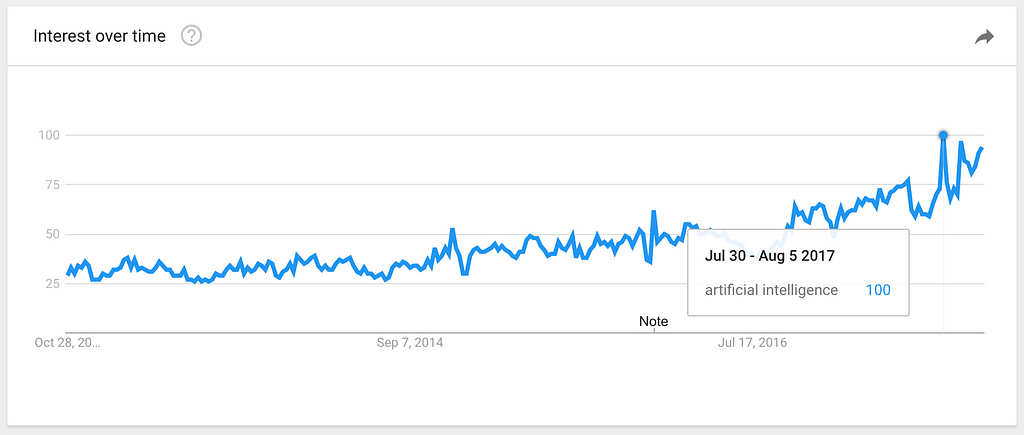
Interest for “Artificial Intelligence” over the last 5 years, according to Google Trends.

Artificial Intelligence is the big buzzword of today. If you are a digital designer, there are good chances that a quick scroll through your RSS reader, Twitter feed or Slack channels will show you more instances of the term “AI” than you would see just a year ago. New products being launched, journalists speculating how many years it will take for robots to take over the world, experts giving their opinion about how to design for AI.

Our entire industry is rushing to launch the world’s first AI-powered _______ (insert a product category here), without a proper use case or business case for it.

It doesn’t matter how it is going to be used, or by whom. What matters is to be the world’s first. Whatever it is. As long as there’s AI powering it.

In the next few months, every vertical of every industry will start to attach the AI-powered label to all its products — as well as its variations “AI-enabled”, “AI-driven”, “AI-controlled”. It’s a process that has been happening in the last 1–2 years and will only intensify moving forward.

On the other hand, products that are proudly created by humans (not robots), will start to attach labels that sit at the extreme opposite of the spectrum: “hand-made”, “hand-crafted”, “curated by humans”, “human-made”.

But what does that mean for UX Designers?

To create anything that will be powered by AI, technologists inherently have to start with the data that will be used to train the AI and ultimately create these amazing AI-powered tools and services. This process is usually driven by engineers — the experts that actually know how to model the intelligence and enable it to take action based on data.

The problem with that is that teams usually pick the first problem that technology can be applied to, without validating it with real users. Is that technology solving a real user need?

Just because something is possible doesn’t mean it should exist in the world.

It’s the same story when the concept of mobile apps came up in the late 2000s. Hundreds of apps were being launched every week, solving problems no one ever had. The vast majority died; the ones that were relevant for people persisted.

As UX Designers, our biggest challenge will be to participate as early as possible in these types of projects. To be designing along with developers, as soon as data is available to be looked at. And to bring the good old design methods of user validation and user research to the moment decisions are made — so companies don’t spend millions of dollars solving problems that don’t exist.


When AI gets in the way of UX was originally published in uxdesign.cc on Medium, where people are continuing the conversation by highlighting and responding to this story.

from Stories by Fabricio Teixeira on Medium https://uxdesign.cc/when-ai-gets-in-the-way-of-ux-17de95f40772?source=rss-50e39baefa55——2